반응형
GitHub - calicorone/algorithm_trading: for Algorithm Trading
for Algorithm Trading. Contribute to calicorone/algorithm_trading development by creating an account on GitHub.
github.com
KAKAO Token 발급
카카오계정
accounts.kakao.com
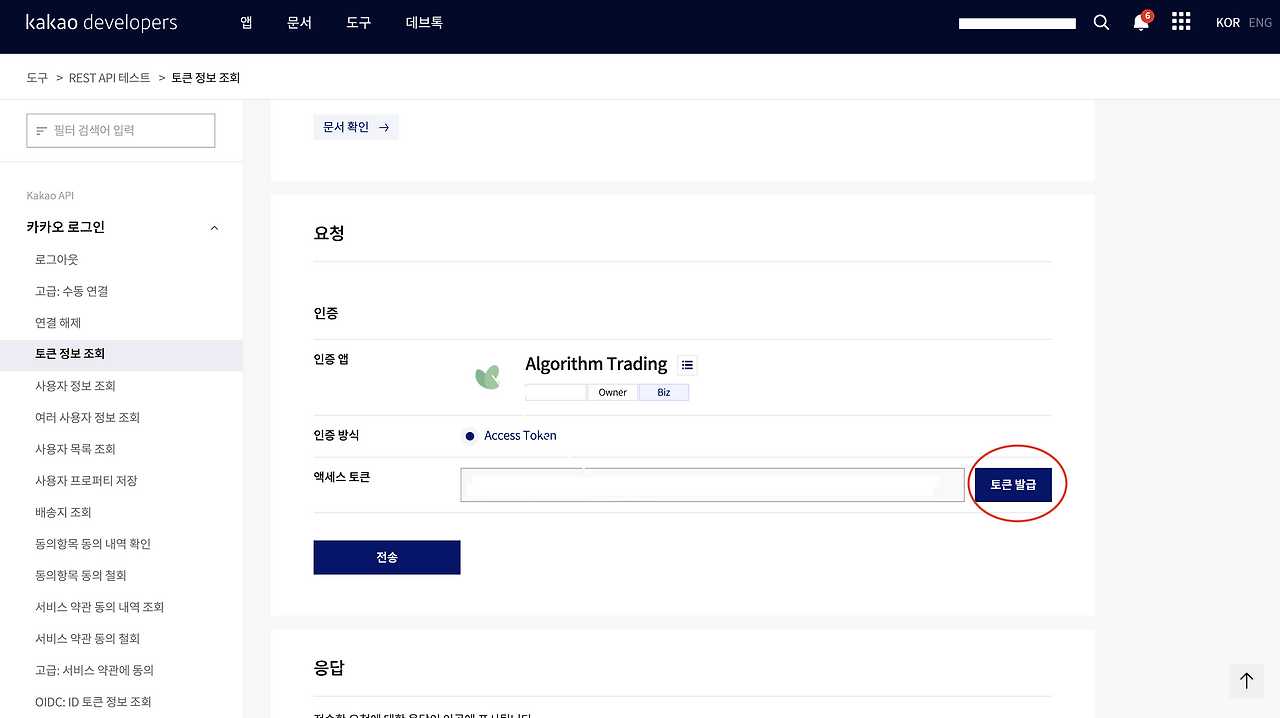
KAKAO Notifiacation 및 종목 전략 기반 분석 기능 추가
Cursor AI로 기존 코드 개선에도 큰 어려움이 없다. 여러 기능을 추가했지만 3일이면 전략 기반으로 나에게 통지할 수 있다. (다른 설정 지식도 필요하지만 그정도야 대학교 때부터 지지고 볶고 삽질한 과정이 있으니 까먹지 않는다.)
대신 코더로서 기능할 이유가 없다는 생각이 들며 따로 코드 입력도 하지 않으면 코드에 대해 직접 입력하는 데 점점 멀어질 것 같으며 사소한 코드는 지식이 전무해질 것 같다는 생각이 든다.
물론 보고 맞는지 검증은 가능하겠지만
"""
알림 시스템 모듈
"""
from .kakao_notifier import KakaoNotifier

__all__ = ['KakaoNotifier']
"""
카카오톡 알림 모듈
카카오톡 REST API를 사용하여 메시지 전송
"""
import requests
import json
from typing import Dict, Any, Optional
from pathlib import Path
class KakaoNotifier:
"""카카오톡 알림 클래스"""
# 카카오톡 API 엔드포인트
AUTH_URL = "https://kauth.kakao.com/oauth/token"
API_URL = "https://kapi.kakao.com/v2/api/talk/memo/default/send"
FRIENDS_URL = "https://kapi.kakao.com/v1/api/talk/friends"
def __init__(self, access_token: str = None):
"""
카카오톡 알림 초기화
Args:
access_token: 카카오톡 액세스 토큰
Note:
access_token은 config_secrets.json에서 로드하거나 직접 전달할 수 있습니다.
"""
self.access_token = access_token
self.session = requests.Session()
if self.access_token:
self._set_headers()
def _set_headers(self):
"""HTTP 헤더 설정"""
self.session.headers.update({
'Authorization': f'Bearer {self.access_token}',
'Content-Type': 'application/x-www-form-urlencoded;charset=utf-8'
})
def send_message(self, message: str) -> bool:
"""
카카오톡으로 메시지 전송 (나에게 기본 템플릿으로 메시지 발송)
참고: 카카오톡 메시지 API 문서
https://developers.kakao.com/docs/latest/ko/message/rest-api
Args:
message: 전송할 메시지
Returns:
전송 성공 여부
"""
if not self.access_token:
print("⚠️ 카카오톡 액세스 토큰이 설정되지 않았습니다.")
print(" 카카오 로그인을 통해 액세스 토큰을 발급받아야 합니다.")
return False
try:
# 카카오톡 메시지 템플릿 생성 (기본 템플릿 - 텍스트 타입)
# 문서: https://developers.kakao.com/docs/latest/ko/message/rest-api#default-template
#
# 텍스트 타입 기본 템플릿 구조:
# {
# "object_type": "text",
# "text": "메시지 내용",
# "link": {
# "web_url": "웹 URL",
# "mobile_web_url": "모바일 웹 URL"
# }
# }
template_object = {
"object_type": "text",
"text": message,
"link": {
"web_url": "https://developers.kakao.com",
"mobile_web_url": "https://developers.kakao.com"
}
}
# Content-Type: application/x-www-form-urlencoded;charset=utf-8
# template_object는 JSON 문자열로 인코딩하여 전달
# ensure_ascii=False로 한글 깨짐 방지
template_json = json.dumps(template_object, ensure_ascii=False)
# data 대신 data 파라미터에 직접 전달 (requests가 자동으로 URL 인코딩)
data = {
'template_object': template_json
}
response = self.session.post(self.API_URL, data=data, timeout=10)
# 오류 응답 상세 확인
if response.status_code != 200:
try:
error_result = response.json()
error_code = error_result.get('code', '')
error_msg = error_result.get('msg', '')
print(f"❌ 카카오톡 API 오류 응답:")
print(f" 코드: {error_code}")
print(f" 메시지: {error_msg}")
# 주요 오류 코드별 안내
if error_code == -501:
print("\n💡 해결 방법:")
print(" - 카카오 로그인을 통해 액세스 토큰을 발급받아야 합니다.")
print(" - 현재 토큰이 카카오톡 사용자와 연결되지 않았습니다.")
print(" - 카카오 개발자 센터에서 앱 설정을 확인하세요.")
elif error_code == -401:
print("\n💡 해결 방법:")
print(" - 액세스 토큰이 만료되었습니다.")
print(" - 카카오 로그인을 통해 새로운 토큰을 발급받으세요.")
elif error_code == -403:
print("\n💡 해결 방법:")
print(" - API 권한이 없습니다.")
print(" - 카카오 개발자 센터 > 앱 설정 > 동의항목에서")
print(" '카카오톡 메시지 전송' 권한을 확인하세요.")
except:
print(f"❌ 카카오톡 API 오류: {response.status_code} - {response.text}")
return False
result = response.json()
if result.get('result_code') == 0:
print("✅ 카카오톡 메시지 전송 성공")
return True
else:
error_msg = result.get('msg', 'Unknown error')
print(f"❌ 카카오톡 메시지 전송 실패: {error_msg}")
return False
except requests.exceptions.RequestException as e:
print(f"❌ 카카오톡 API 요청 실패: {e}")
if hasattr(e, 'response') and e.response is not None:
try:
error_result = e.response.json()
print(f" 오류 상세: {error_result}")
except:
print(f" 응답 내용: {e.response.text}")
return False
except Exception as e:
print(f"❌ 카카오톡 메시지 전송 오류: {e}")
return False
def send_formatted_message(self, title: str, content: str, footer: str = None) -> bool:
"""
포맷된 메시지 전송
Args:
title: 메시지 제목
content: 메시지 내용
footer: 메시지 하단 (선택사항)
Returns:
전송 성공 여부
"""
message = f"{title}\n\n{content}"
if footer:
message += f"\n\n{footer}"
return self.send_message(message)
def test_connection(self) -> bool:
"""
카카오톡 API 연결 테스트
Returns:
연결 성공 여부
"""
if not self.access_token:
print("⚠️ 카카오톡 액세스 토큰이 설정되지 않았습니다.")
return False
try:
# 친구 목록 조회로 연결 테스트
response = self.session.get(self.FRIENDS_URL, timeout=10)
response.raise_for_status()
print("✅ 카카오톡 API 연결 성공")
return True
except requests.exceptions.RequestException as e:
print(f"❌ 카카오톡 API 연결 실패: {e}")
if hasattr(e.response, 'status_code'):
if e.response.status_code == 401:
print(" 액세스 토큰이 만료되었거나 유효하지 않습니다.")
elif e.response.status_code == 403:
print(" API 권한이 없습니다. 카카오톡 개발자 센터에서 권한을 확인하세요.")
return False
except Exception as e:
print(f"❌ 카카오톡 API 연결 테스트 오류: {e}")
return False
def create_kakao_notifier(config: Dict[str, Any]) -> Optional[KakaoNotifier]:
"""
설정에서 카카오톡 알림 생성
Args:
config: 설정 딕셔너리
Returns:
KakaoNotifier 인스턴스 또는 None
"""
notifications_config = config.get('notifications', {})
kakao_config = notifications_config.get('kakao', {})
if not kakao_config.get('enabled', False):
return None
access_token = kakao_config.get('access_token')
if not access_token:
print("⚠️ 카카오톡 알림이 활성화되어 있지만 access_token이 설정되지 않았습니다.")
return None
return KakaoNotifier(access_token=access_token)

p.s. 전략이나 기업 정보 및 API, 토큰 정보들은 전부 보안으로 설정해두었다.
반응형
'開發' 카테고리의 다른 글
| Meta: Graph API Explorer 이용해서 Instagram 사진 자동 연동 하기 (0) | 2026.01.18 |
|---|---|
| Cloudflare: Worker로 RSS Proxy 설정하기 (0) | 2026.01.18 |
| Cursor AI: 데이터 공유 및 학습 방지 설정 가이드 (0) | 2026.01.12 |
| Kakao: 카카오톡 알림 모듈 (w/Kakao Developers) (0) | 2026.01.11 |
| 알고리즘 트레이딩(Algorithmic Trading): 돈 버는 비법이 책에 있을 리 없다 (0) | 2026.01.10 |