반응형
Graph API Explorer 이용해서 Instagram 사진 자동 연동 하기
- Instagram 게시물을 자동으로 가져온다
- 프론트엔드에 직접 토큰을 노출하지 않는다
- 장기적으로 안정적인 구조를 유지한다
최종 아키텍처
Instagram Graph API
  ↓
Cloudflare Worker
  ↓
Frontend (React 등)
Cloudflare Worker는 선택 사항이 아니라 필수 중간 레이어다.
핵심 전제 조건
Instagram Graph API는 단독 Instagram 계정으로는 사용할 수 없다.
다음 구조가 반드시 필요하다.
Facebook 사용자
  └ Facebook Page
        └ Instagram Business Account
다음은 모두 불가능하다.
- 개인 Instagram 계정만 있는 경우
- App ID / App Secret / Access Token만 있는 경우
- Facebook Page가 없는 경우
준비물 체크리스트
1. Facebook Page
- Facebook 계정이 Page의 관리자여야 한다
2. Instagram 계정
- Business 또는 Creator 계정
- Facebook Page에 연결되어 있어야 한다
3. Meta App
- Use Case: Instagram API
- 최소 권한
- instagram_basic
- pages_show_list
- 본인 계정만 사용할 경우 App Review는 필요 없다
Graph API Explorer 사용 순서
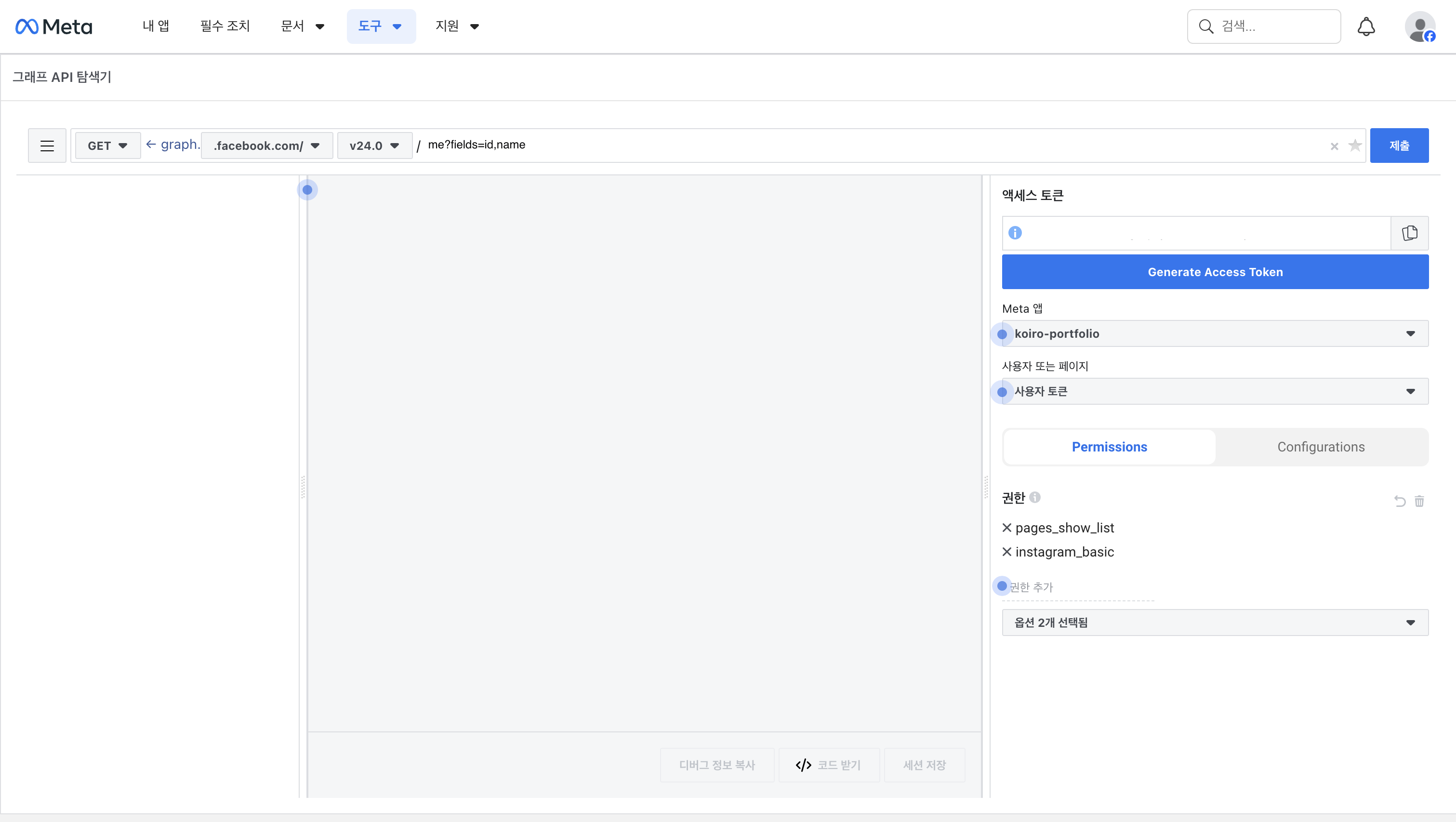
모든 요청은 graph.facebook.com 컨텍스트에서 실행해야 한다.
Step 1. Facebook Page 목록 조회
GET /me/accounts?fields=id,name응답 예시:
{
  "data": [
    { "id": "PAGE_ID", "name": "My Page" }
  ]
}
여기서 PAGE_ID를 확보한다.
Step 2. Page에 연결된 Instagram Business Account 조회
GET /PAGE_ID?fields=instagram_business_account응답 예시:
{
  "instagram_business_account": {
    "id": "IG_USER_ID"
  }
}
이 값이 Instagram API에서 사용하는 사용자 ID다.
값이 null이면 Page와 Instagram이 아직 연결되지 않은 상태다.
Step 3. Instagram 미디어 조회
GET /IG_USER_ID/media
  ?fields=id,caption,media_type,media_url,thumbnail_url,permalink,timestamp
  &limit=4
이 요청이 성공하면 API 연결은 완료다.
Cloudflare Worker의 역할
Worker는 다음 책임을 가진다.
- Access Token 보호
- API 호출 캐싱으로 Rate Limit 방지
- CORS 문제 해결
- 프론트엔드에서 쓰기 쉬운 형태로 데이터 정규화
Cloudflare Worker 기본 코드 예시
아래 코드는 변수만 교체해서 재사용할 수 있다.
export default {
  async fetch() {
    const IG_USER_ID = '__IG_USER_ID__';
    const ACCESS_TOKEN = '__LONG_LIVED_ACCESS_TOKEN__';

    const url =
      `https://graph.facebook.com/v24.0/${IG_USER_ID}/media` +
      `?fields=id,caption,media_type,media_url,thumbnail_url,permalink,timestamp` +
      `&limit=4&access_token=${ACCESS_TOKEN}`;

    const res = await fetch(url);
    const json = await res.json();

    if (json.error) {
      return new Response(
        JSON.stringify({ error: json.error }),
        { status: 500 }
      );
    }

    const normalized = json.data.map(item => ({
      id: item.id,
      image_url: item.media_url || item.thumbnail_url,
      link: item.permalink,
      caption: item.caption,
      timestamp: item.timestamp
    }));

    return new Response(JSON.stringify(normalized), {
      headers: {
        'Content-Type': 'application/json',
        'Access-Control-Allow-Origin': '*',
        'Cache-Control': 'public, max-age=600'
      }
    });
  }
};
프론트엔드 사용 방식
프론트에서는 Worker 엔드포인트만 호출하면 된다.
fetch('https://your-instagram-proxy.workers.dev')
  .then(res => res.json())
  .then(data => {
    // data: [{ image_url, link, caption, timestamp }]
  });
자주 발생하는 실수
- App ID를 Page ID 또는 IG User ID로 착각하는 경우
- graph.instagram.com에서
/me/accounts를 호출하는 경우 - Facebook Page 없이 Instagram API를 시도하는 경우
- RSS 또는 HTML 스크래핑으로 우회하려는 경우
반응형
'開發' 카테고리의 다른 글
| Google: Distillation, Experimentation, and (Continued) Integration of AI for Adv (0) | 2026.02.13 |
|---|---|
| Meta: Long-Lived Tokens 발급하기 (0) | 2026.01.19 |
| Cloudflare: Worker로 RSS Proxy 설정하기 (0) | 2026.01.18 |
| 알고리즘 트레이딩(Algorithmic Trading): KAKAO Notifiacation 및 종목 전략 기반 분석 기능 추가 (0) | 2026.01.15 |
| Cursor AI: 데이터 공유 및 학습 방지 설정 가이드 (0) | 2026.01.12 |